Showing posts with label Armoured Engines. Show all posts

Saturday, February 13, 2016

Armoured Engines Dev Blog - Level System


We've been working on the level system for Armoured Engines. I wanted to create something completely data driven, so that the designers could easily tweak the levels without having to touch Unity scenes, let alone code. This makes sense for Armoured Engines because we don't have a static level with enemies placed that you travel around - instead, our levels are more like a theatre stage where things enter and exit.

I chose to base my implementation of the level system on the stage metaphor - everything that comes into the scene (images, enemies, audio, cutscenes, etc) is an actor.  Each actor is brought onto the stage via a cue. So the actual level file is simply made up of a JSON list of cues, which have metadata attached to them that their cue type can interpret. This includes things like position, speed, audio settings, enemy specific settings, and more. Each cue has an enter time, and some also have an exit time, while others only play once, or loop indefinitely.

Here's an example of some of the cues for the Crystalwhim Caverns, one of the levels shown in our trailer:
"cues" :
[
{
"type" : "GRAPHIC",
 "resourceName" : "ZN-WhiteSands/LV-CrystalwhimCaverns/CrystalwhimCaverns-Rails",
 "startTime" : 0,
 "position" : -5,
 "speed" : 8,
 "layer" : "Train",
 "order" : -10,
 "tile" : true,
 "loop" : true,
 "prewarm" : true,
 "scale" : 0.5,
 "spacing" : -0.7
},
 {
"type" : "GRAPHIC",
 "resourceName" : "ZN-WhiteSands/LV-CrystalwhimCaverns/CrystalwhimCaverns-Rockline2",
 "startTime" : 0,
 "position" : -3,
 "speed" : 1.0,
 "layer" : "Background",
 "order" : -8,
 "spacing" : -2,
 "tile" : true,
 "loop" : true,
 "prewarm" : true,
 "tint" : [150,150,150]
},
 {
"type" : "GRAPHIC",
 "resourceName" : "ZN-WhiteSands/LV-CrystalwhimCaverns/CrystalwhimCaverns-Rockline1",
 "startTime" : 0,
 "position" : -3.5,
 "speed" : 1.25,
 "layer" : "Background",
 "order" : -6,
 "spacing" : -1,
 "tile" : true,
 "loop" : true,
 "prewarm" : true,
 "tint" : [150,150,150]
},
 {
"type" : "GRAPHIC",
 "resourceName" : "ZN-WhiteSands/LV-CrystalwhimCaverns/CrystalwhimCaverns-Rockline2",
 "startTime" : 0,
 "position" : -4,
 "speed" : 1.5,
 "layer" : "Background",
 "order" : -4,
 "spacing" : -1,
 "tile" : true,
 "loop" : true,
 "prewarm" : true
},
 {
"type" : "GRAPHIC",
 "resourceName" : "ZN-WhiteSands/LV-CrystalwhimCaverns/CrystalwhimCaverns-Rockline1",
 "startTime" : 0,
 "position" : -4.5,
 "speed" : 1.75,
 "layer" : "Background",
 "order" : -2,
 "spacing" : -1,
 "tile" : true,
 "loop" : true,
 "prewarm" : true
}
]

The above example produces the stalagmites lining the bottom of the level, as well as the rails the train runs on. It produces the following in game:
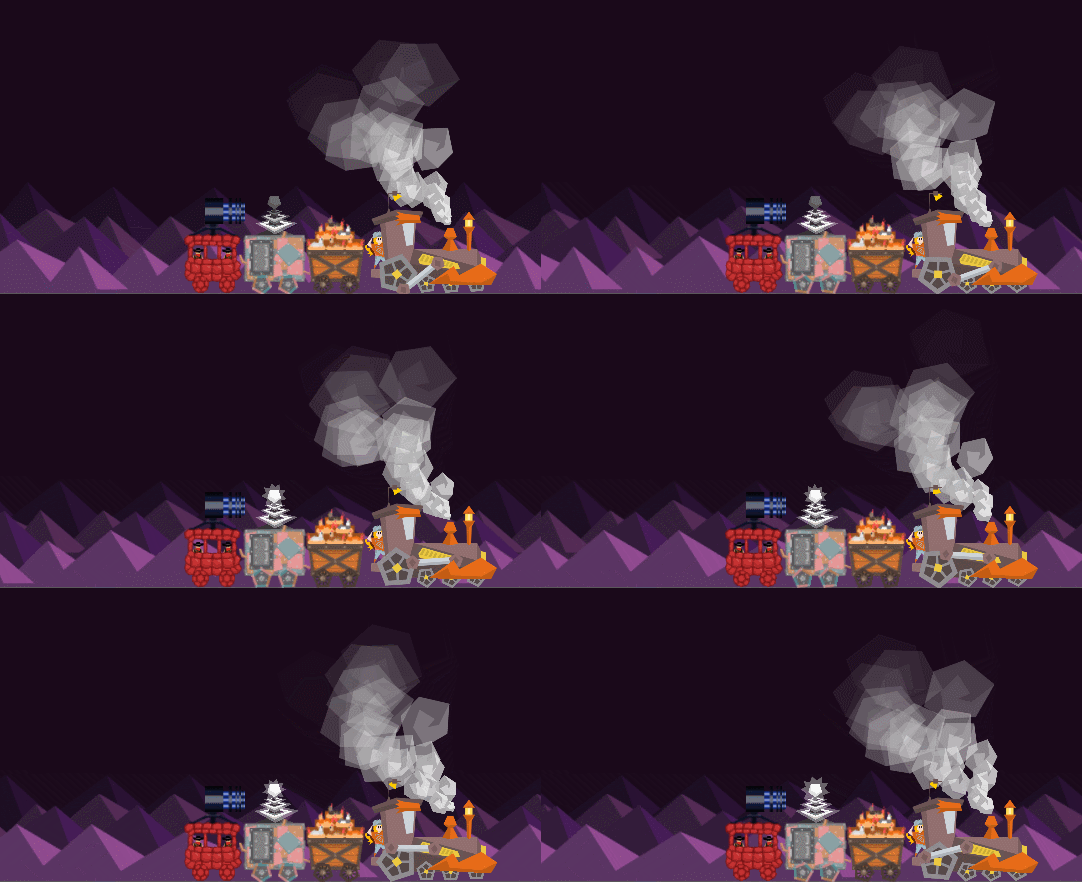
LevelSystemExample

We can bring in some enemies by using some more cues:
 {
"type" : "ENEMY",
 "resourceName" : "EN-IceBat",
 "startTime" : 1,
 "position" : [-7,2.5],
 "heat" : [5, 10]
 },
 {
"type" : "ENEMY",
 "resourceName" : "EN-IceBat",
 "startTime" : 2,
 "position" : [-7,2.5],
 "heat" : [5, 10]
 },
 {
"type" : "ENEMY",
 "resourceName" : "EN-IceBat",
 "startTime" : 3,
 "position" : [-7,2.5],
 "heat" : [5, 10]
 },
 {
"type" : "ENEMY",
 "resourceName" : "EN-CrystalRock",
 "startTime" : 4,
 "position" : [-7,2.5],
 "heat" : [5, 10]
 }

The enemies will come on screen based on their cue entry times:
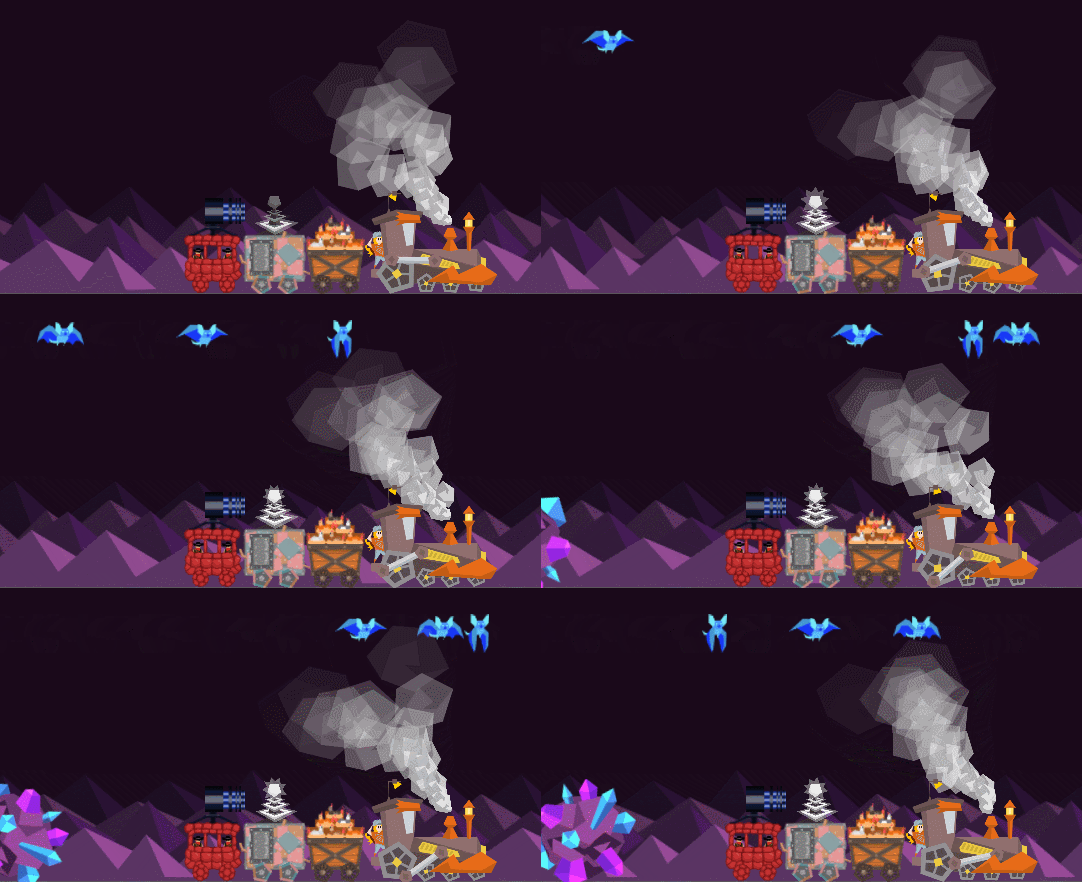
LevelSystemExample2

This should allow us to easily create hand crafted levels and fine-tune enemy entrances and exits. It will also allow us to add many fun and quirky custom background events and animations, since in the code they are all handled the same way. A lot of the appeal of Armoured Engines comes from it's quirky and colourful presentation, so these touches are really important to achieving the game feel we are going for.

Saturday, November 21, 2015

Armoured Engines Dev Blog - Loading Screen

This post first appeared on the Bounder Games development blog at boundergames.com.

I recently had a fellow indie dev on Twitter asking how we made the Armoured Engines loading screen, so I wanted to share the process with all of you! This process can be used to make an animated loading screen using Unity 5.


The SceneManager


First of all, I have a group of "manager" game objects which all have the DontDestroyOnLoad() function called, so these objects persist throughout the game. One of these is the SceneManager, a singleton object that can be easily accessed from any script in the project. It does a few different things such as abstracting level, town, and map loading - but most importantly, it handles the scene transition.

Here is the function where all the magic happens:

public IEnumerator LoadScene(string sceneName, string music)
{
// Fade to black
yield return StartCoroutine(m_blackness.FadeInAsync());

// Load loading screen
yield return Application.LoadLevelAsync("LoadingScreen");

// !!! unload old screen (automatic)

// Fade to loading screen
yield return StartCoroutine(m_blackness.FadeOutAsync());

float endTime = Time.time + m_minDuration;

// Load level async
yield return Application.LoadLevelAdditiveAsync(sceneName);

if (Time.time < endTime)
yield return new WaitForSeconds(endTime - Time.time);

// Load appropriate zone's music based on zone data
MusicManager.PlayMusic(music);

// Fade to black
yield return StartCoroutine(m_blackness.FadeInAsync());

// !!! unload loading screen
LoadingSceneManager.UnloadLoadingScene();

// Fade to new screen
yield return StartCoroutine(m_blackness.FadeOutAsync());
}

As you can see, this function is a coroutine. I won't be going into the details of coroutines but they are basically awesome so I definitely suggest reading up on them. Without a coroutine this function would have to be handled using Update() and would be much more complicated!

Load the Loading Screen


We don't just want the loading screen to appear abruptly over our current screen - in game dev, you very seldom want anything to just appear. Instead, we will fade to black (since for our scene the loading screen is black), then load the loading screen, then fade the black away.

To do this we use three asynchronous methods. First we use a simple coroutine I wrote which is attached to a simple black sprite covering the scene: FadeInAsync(). This simple change the sprite's alpha from 0 to 1.0 over a set number of seconds.

// Fade to black
yield return StartCoroutine(m_blackness.FadeInAsync());

Once that coroutine returns, the screen is black and ready for our loading screen to be loaded. Here I use Application.LoadLevelAsync(), a built in Unity function. This unloads our current scene (aside from things marked DontDestroyOnLoad() such as our SceneManager and its black sprite) and loads our new scene.


// Load loading screen
yield return Application.LoadLevelAsync("LoadingScreen");

// !!! unload old screen (automatic)

Once LoadLevelAsync() returns, it's time to fade out our black using FadeOutAsync(), the reverse of our previous FadeInAsync().


// Fade to loading screen
yield return StartCoroutine(m_blackness.FadeOutAsync());


Loading the New Scene


Loading the next scene is a bit more complicated. I use Application.LoadLevelAdditiveAsync() to load in our new scene. This loads the new scene but does not destroy anything in our loading scene. This means that is going to have to happen manually! Don't forget this or you will end up with both your new scene and the loading scene active when the process is done.

float endTime = Time.time + m_minDuration;

// Load level async
yield return Application.LoadLevelAdditiveAsync(sceneName);

Another thing to note is that you will need to make sure your loading scene is on a higher layer than everything else in your new scene, or the new scene has any renderers turned off when loaded. Otherwise the new scene elements will draw on top of your loading scene.

Similarly, make sure any logic in your new scene is paused until your loading scene is completely gone - otherwise your character may die before the scene is loaded!

At this point, we chose to set a minimum amount of time for the loading scene to run, in order for it not to look jerky for very short load times. To do this, we simply wait for the remaining seconds that have not yet elapsed. This is completely optional, but if you use it make sure this time is quite short.

if (Time.time < endTime)
yield return new WaitForSeconds(endTime - Time.time);

This is also the time at which we chose to start our next scene's music, but that may be different for your project. We have a music manager which handles fading out old music and in new music using the PlayMusic() function.

// Load appropriate zone's music based on zone data
MusicManager.PlayMusic(music);


Unload the Loading Screen


Once the new scene is loaded in the background, it is time to get rid of our loading screen. Again, we don't want it to just instantly disappear, We face back in the black background first, again using FadeInAsync().


// Fade to black
yield return StartCoroutine(m_blackness.FadeInAsync());

Once the black background is faded in, we can get rid of the loading screen. However, there is no built in method to do this since the loading screen and new scene are now merged into the active scene. To get rid of the loading screen, we've created a separate singleton that lives on the root object of the loading screen called LoadingSceneManager. This singleton's sole responsibility is deleting it's object, though in the future we may add more functionality such as a loading bar or percentage display. For now we call a simple function UnloadLoadingScene() which simply destroys the loading scene's root object.

// !!! unload loading screen
LoadingSceneManager.UnloadLoadingScene();

At this point, if you have turned off drawing for your new scene, you should turn it back on before fading the black screen cover away.

With the loading screen destroyed we are free to fade away the black using FadeOutAsync(). At this point you may want to signal to your in game scene that the new level is ready to start, so game logic can be turned back on.

// Fade to new screen
yield return StartCoroutine(m_blackness.FadeOutAsync());


Potential Issues


When implementing this, we had several issues. First, the cameras in our title screen and in game level had different orthographic sizes, so when the new scene finished loading, the scene appeared to jump to a new size. For us this was simple as we hadn't actually intended for the cameras to be different sizes, so we simply fixed that error and things were fine, but if you do intend to have different sizes you should make sure you load your new camera during one of the black sections rather than during the loading screen itself.

We also had a problem with our UI from our new scene showing on top of our loading screen and black backgrounds. This is because our UI was set to use screen space overlay and could not have a rendering layer set. We solved this by tying the UI in each scene to it's camera, and settings a render layer below that of the loading screen. This may not work for everyone, so if you need your UI in screen space overlay you can may your black screen cover a UI object rather than a sprite and make sure it draws on top of your UI. You will also need to turn off the drawing of your UI until the black screen cover has faded in.

Hopefully this will help someone else make an animated loading screen! Feel free to ask any questions in the comments or contact me on Twitter @Jiyambi!

Saturday, July 12, 2014

The State of Bounder Games

Wow, it's been a while since I've posted! Life has been busy. In the last four months I've been on trips to Spain and then to the United States to visit family; I've gone through hell and back to get my work visa sorted so I can stay living in Scotland; I've been working full time at Ninja Kiwi during the day; I've graduated from university (finally) with a Master's of Science (with distinction) in Computer Games Technology. Most importantly, though, I've continued to work with Bounder Games, my indie team, on what has now become two game projects: Armoured Engines and Combo Carts.


Anyone who follows this blog knows about Armoured Engines. However, that game has been set aside at the moment while the team works on a smaller game I came up with while looking at abstract diagrams of train tracks: Combo Carts. It plays somewhat like 2048 or Threes, except for one important fact: rather than tiles, you are pushing around carts on tracks. That means they can't always move in a particular direction, because the tracks prevent them.


The goal of the game is to combine carts as much as possible, making as many precious minerals as possible, before the board fills up. Only carts carrying the same type of cargo can combine. In free play mode, the map is randomly generated for each game, making each play through a new experience. We will also have pre-designed maps with particular goal cargo.

We chose to switch gears to work on this project instead of Armoured Engines for a very good reason - Armoured Engines was too big. We specifically chose it because it was a smaller game idea than most of our others, but it was still a full game with a story and lots of different mechanics. Combo Carts is much more bite-size in nature, concentrating on repeated play of one simple mechanic. It is a game I was able to code in a few hours, though polish and added features are taking significantly longer than that. It is a game we can use to get a feel for how releasing a game on the various mobile marketplaces actually works, since this will be our first. Essentially, it is practice. Serious practice and a real effort at making a high quality game, but practice none-the-less.

Combo Carts will be released later this month. After that, we plan to go back to work on Armoured Engines, but there is no way we will make our original September release date. Instead, we are aiming to release Armoured Engines in late November / early December, in time for Christmas.

In other news, we've gotten word that the Abertay Game Development Society, of which we are members, has secured a booth at Dare To Be Digital Protoplay here in Dundee. That means Bounder Games will be showing both Combo Carts and Armoured Engines there in August. If you live in the area, do yourself a favour and come play our games (and many others) for free!


Saturday, March 29, 2014

Armoured Engines: A Game Takes Shape

Armoured Engines is now out of pre-production and in to full force development. The team has been cracking away for the last week and it's time for a development update!

Movement


Basic train movement was set up right away, followed by a scrolling background and foreground to give a feeling of constant speed. The train can be moved back and forth via dragging, with a nice acceleration/deceleration action that allows the player to "fling" the train back and forth along the track. Bounds were set up so the train couldn't be thrown off screen. While more fine tuning is needed, this mechanic is already feeling really nice and fun to control.

Cargo Flinging


The most basic method for dealing with enemies in the game is to fling the cargo you are carrying at them. This week we implemented cargo flinging, and our first cargo type: coal. We've got plans for lots of zany cargos in the future, some which weaponize better than others, but for now we'll be moving on to other features before adding more types.

Enemies


We wanted to get an enemy into the game right away to test against. We chose the Mortar as our first enemy as it's movements and AI are very simple - it simply scrolls across the screen in the background and fires mortars into the air, which must then be dodged or shot down as they fall onto the train. We also created a health system for the train, which sets each carriage up with a small pool of health. This means that each carriage can be lost individually - but if your engine is destroyed, the level is lost and your train limps back into town empty-handed.

Playtesting

We've been forcing the game on our friends and colleagues every chance we get, and have already gained many valuable insights about our control schemes. It's always surprising to see how someone else will attempt to control a game. One of our testers used much longer swipes when flinging coal, which we hadn't expected at all and had to re-program to account for. Others attempted to swipe higher or lower on the train than we were expecting. We learned a ton and will continue to test regularly with as many people as possible.

Overall the reaction to our game has been really positive, with many people asking when we'll be showing more of it. If you are one of those folks anxious for more Armoured Engines, you can follow us on Twitter, Facebook, Google+, or Tumblr.

Next Week

Next week, we'll be adding weapons to the train and improving the way we represent the train in data, so it can be loaded into different scenes and customized. We'll also be doing design work for many of the game's enemies.

Saturday, March 15, 2014

Armoured Engines: A New Project Begins


I am very happy to announce that my small indie team, Bounder Games, are working on a new project. I have come to think of it as a "steam punk western epic", on mobile devices, called Armoured Engines. In the game, you take on the role of a train engine owner who travels between towns in the wild west, protecting the train and making important deliveries. Bandits, evil robots, hostile monsters, and more will attempt to cripple your steam-powered locomotive. Luckily you have at your disposal an arsenal of weaponry with which to fight back. The game will make use of intuitive touch control methods, different for each type of weapon. Some will be mostly autonomous while others will be more manually controlled. A big part of the game will be customising your engine, choosing what and how much cargo to take and where to travel. You can also hire helpers, which provide more functionality for your train (repairing damaged cars, boosting weapon performance, etc). Finally, there will be an overarching story linking all this together, of a grandiose style suitable for something dubbed a "steam punk western epic".

Meet The Team


Sarah Herzog
"Mama Bounder"
Speciality: Leadership, Programming
Other Talents: Art
Background: Sarah has been, at various points in her life, a writer, singer, artist, drama teacher, martial artist, chemical engineer, nanotechnology researcher, engineering education researcher, science teacher, tech support grunt, quality assurance monkey, and finally, most recently, a game programmer. So many hats leads to only one thing: indie game development.


Roy Stevens
"Bounder Bug"
Speciality: Writing
Other Talents: Art, Design
Background: Roy is a student at prestigious game development university Abertay. He has loved games for as long as he can remember, and has always wanted to have a hand in making them. Like the rest of the team, he has a wide range of talents and excels when allowed to have a hand in everything.


Kyle Drysdale
"Song Bounder"
Speciality: Audio
Other Talents: Art, Design, Writing
Background: Kyle is a recent graduate from a creative audio production degree at Abertay University. He shares a deep love of games with his team-mates, and specialises in making awesome music and SFX for games. However, he also is a talented graphic designer, artist, writer, and game designer.


The Plan

The Bounder Games team has big plans. Someday, we want to make amazing, long-term games that will take a year or two to develop and will have a crazy amount of depth and longevity to them. However, to get started, we focused on choosing a game idea that could be developed in only a few months - our target release date is September 1st. To that end, the team met and each of us pitched three ideas, all with the goal of promoting our style while meeting this time constraint. Armoured Engines was the unanimous choice.

Concept mock up of part of the world map

Now, we work. For the last week, and continuing into the next week, we have been in pre-production. This means, for us, creating concept pieces and mocks of how the various stages of the game make look, planning what features will be in the game, and working on story and characters. After that, we dive head first into production. It will be difficult, as I have a day job and Roy has university. We also have a couple planned trips out of the country later in the year that will disrupt our work flow. But despite all this, I am confident that we will be able to deliver a high quality game by September.

I will be posting regular development updates here and on the team's many pages. If you've got any social media accounts, it would be a big help to us to give us a follow/like, or, if you are feeling generous, a share. Our accounts are:
Drop by and say "Hi!", and look forward to our future updates!